Adding alt text to your images is the first rule of image SEO and it’s also a key principle of web accessibility.
This is an in-depth guide about the alternative text attribute: from what is an alternative text to how to perfectly write them for better rankings in Google Images and web search.
I have added to this tutorial several examples of optimized alt tags for SEO with explanations, a do’s and don’ts table, e-commerce alt text patterns, and an image SEO checklist.
There is also a dedicated section about Alt text in WordPress and AI alt text generators.
Let’s get started!

An alternative text is an HTML attribute that should always be added to your image (<img>) elements. Alt texts provide a textual alternative to visual content in web pages.
The textual alternative should describe the appearance and function of the image on the page. People often forget to include the function of the image when they fill out alternative texts. Mentioning the function is not really important for SEO, but it’s key for accessibility. I’ll come back to this topic later, when we go through the alt text examples.
Alt tags should be applied whatever the image format: this attribute is compatible with JPEG, WebP, PNG, GIF, AVIF, and SVG.
If the image you are displaying has no function or editorial purpose the alt text can be left empty.
<img src="decorative-divider.jpeg" alt="" />Technically speaking you should not use the term alt tag to refer to alternative texts because it’s not a tag, but a possible attribute of img elements. However, who cares?
Alternative text, alt text, alt tag, alt description, alt attribute: they are synonyms and designate a text alternative to an image.
It’s important for accessibility and SEO to pay attention to alternative text but you can ignore title text.
Title texts are just there to give a title to your pictures. Search engines don’t care about them: they are useless for search engine optimization. Title tag optimization should therefore be your last priority.
That’s one of the reasons why our Image SEO Optimizer for WordPress addresses the issue of alt text but not title text.
In its article Using ALT attributes smartly Riona MacNamara from Google Webmaster Tool Team told us:
“Googlebot does not see the images directly, we generally concentrate on the information provided in the “alt” attribute.”
If you want to know more about it, I invite you to read my article about the image attributes optimization for SEO. You will find more information about the title text attribute there.
With the rise of Artificial Intelligence, Google and Bing are able to read your pictures. However, they don’t always do it because it would be too slow and expensive for them at scale. That’s why alternative texts are so important for SEO and image SEO: they offer you the possibility to tell Google what your photos are about in a few keywords.
I write this in almost all my articles, but on-page SEO is largely about helping Search Engines understand your content.
An image with a bad file name and no alt text will poorly rank in Google Image search results — but the impact goes beyond that.
Images with no alternative text constitute a grey area on your page for search engines. Helping Google to unlock the meaning of your images also improves the global semantic relevance of your page. The alt text attribute is, in a sense, Google’s crawling robots’ best friend.
Does alt text help SEO? Absolutely. Google has confirmed multiple times that alt text is one of the key factors they use to understand image content. It helps your images rank in Google Images, and it strengthens the topical relevance of the entire page for your target keywords.
Nowadays, having access to the internet is almost a human right. Your site should be accessible to everybody — including visually impaired or blind people. That’s why alternative texts are important.
Providing a textual alternative to your photos allows people using screen readers or software such as JAWS and NVDA to literally read your images even though they can’t see them.
Adding alternative texts to your pictures is the right thing to do. Moreover, it’s a market of millions of people all over the world.
Also, Title III of the Americans with Disabilities Act prohibits discrimination based on disability. There is a growing number of legal cases regarding website accessibility and more and more judges are stating that online retailers must comply with the ADA regulation.
For your information, accessibility is also one of the core principles of WordPress.
Alt text is not just good practice — in many jurisdictions, it’s a legal requirement. Understanding the compliance landscape helps you avoid costly lawsuits while making the web better for everyone.
WCAG 2.1 Success Criterion 1.1.1 (Non-text Content) requires that all non-text content presented to the user has a text alternative that serves an equivalent purpose. This is a Level A requirement — the most basic level of accessibility compliance.
In practical terms, this means:
alt="")The number of web accessibility lawsuits has been rising every year. In 2019, Domino’s Pizza lost a landmark case when the Supreme Court declined to hear their appeal against a blind customer who could not order food on their website. The ruling confirmed that the ADA applies to websites.
E-commerce sites are the most frequent targets. If your product images lack alt text, screen reader users literally cannot tell what you’re selling. That’s both a missed sale and a legal risk.
The European Accessibility Act (EAA), taking full effect in 2025, extends similar requirements across the EU. If you operate internationally, alt text compliance is non-negotiable.
When a screen reader encounters an image, it reads the alt text aloud. If no alt text is present, some readers will read the file name instead — which usually sounds something like “IMG underscore 2847 dot JPEG.” That’s a terrible user experience.
If the alt attribute is completely missing (not just empty), some screen readers will try to announce the image URL, which is even worse. Using alt="" on decorative images tells screen readers to skip the image entirely, which is the correct behavior.
Google’s ability to understand images has advanced dramatically. With Google Lens processing billions of queries, MUM (Multitask Unified Model) understanding content across languages and formats, and AI Overviews pulling image context into search results, you might wonder: are alt tags still relevant for SEO?
The answer is yes, and here’s why.
While Google can identify objects in photos using computer vision, alt text provides context that AI cannot reliably determine. A photo of a person at a desk could be a CEO, a customer, or a stock photo. Only your alt text tells Google which one it is and why it matters to your page content.
Google’s John Mueller has repeatedly confirmed that alt text remains one of the strongest signals for image search. In 2023, he stated that Google uses alt text to understand both the image itself and the page it appears on.
Here’s what alt text does that computer vision cannot:
Bottom line: Google’s AI supplements alt text, it doesn’t replace it. Writing good alt text in 2026 remains one of the highest-ROI on-page SEO activities you can do.
This being said, let’s focus on what you probably came for: how to perfectly write alternative texts?
I said previously that the function and context were key. Every time an image plays a function on your page, you should provide a textual alternative. The other way around, when an image is purely decorative, the alternative text can be left empty.
Let’s practice with some alternative text examples!
When an image is somehow linked to your editorial content, you must provide a textual alternative. This includes the photos you might use in your blog articles, your product sheets, etc.
When determining how to write appropriate alternative texts for images, context is everything. One alt for one image may be vastly different based upon the context and surroundings of the image itself.
Good alternative texts are short, but descriptive, present the content, enhance context, and give the function of the image if necessary.
A long time ago, in a wonderful world dominated by Internet Explorer 6, HTML and CSS were not offering much possibility to front-end developers.
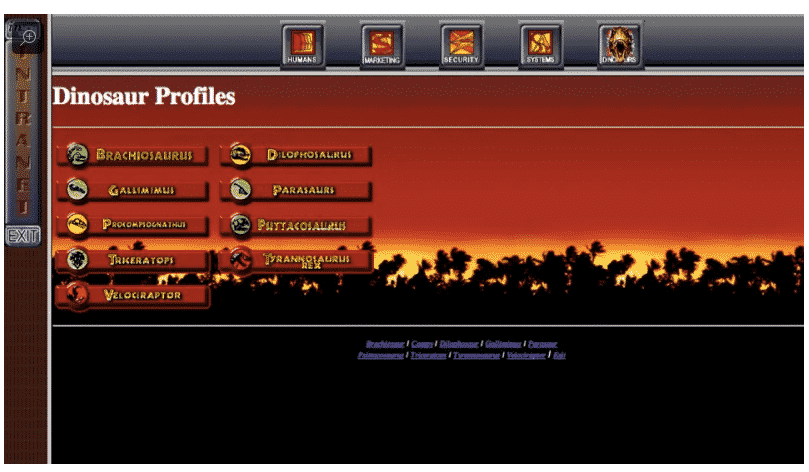
Front-end developers did not even exist because the only way to make something aesthetic was to put an image in a table element. No border-radius, no box-shadow, etc.
One of the consequences was that people were using images for their menu. In such situations, it is necessary to provide an alternative text to the image.
In our example, each item of the menu should have an alt text: “Brachiosaurus” for the first link, “Gallimimus” for the second, etc.
There is no need to add “Link to” because the image will be identified as being within a link.
Thanks to common sense, Google, Mozilla Firefox and the W3C, functional images are slowly disappearing.
How to spot if an image is decorative or not? You have to answer a double question:

In this situation, the stars close to the WordPress logo are mainly decorative.
Indeed, they are not directly linked to what we are talking about and they are not functional at all, since they are not providing an external link to our amazing WordPress reviews.
If both answers are “No,” the image is decorative. Use alt="" (an empty alt attribute). Do not omit the alt attribute entirely — that’s invalid HTML and confuses screen readers.
Common decorative images include: background patterns, visual dividers, hero images that repeat the heading text, and stock photos used purely for aesthetics.
Perfect Alt for SEO: Cathedral Notre Dame de Paris surrounded by clouds
Decent Alt for SEO: Notre Dame de Paris
Bad alt for SEO: Cathedral

Perfect Alt for SEO: Adult Red Kangaroo in the Australian desert
Decent Alt for SEO: Red Kangaroo
Bad alt for SEO: Kangaroo

Perfect Alt for SEO: White rose flower in a natural garden
Decent Alt for SEO: White rose
Bad alt for SEO: Flower

Perfect Alt for SEO: Tesla Model 3 charging at an electric station in a parking lot
Decent Alt for SEO: Tesla on a parking lot
Bad alt for SEO: Car
Here’s a scannable reference for what to put in alt text for SEO and what to avoid:
| Do ✓ | Don’t ✗ |
|---|---|
| Be descriptive and specific: “Golden retriever puppy playing fetch in a park” | Be vague: “Dog” |
| Include your target keyword naturally when relevant | Stuff keywords: “dog puppy pet canine golden retriever dog photo” |
| Keep it under 125 characters (screen reader friendly) | Write a full paragraph as alt text |
| Describe the image’s function if it’s a button or link | Start with “Image of” or “Picture of” (screen readers already announce it as an image) |
Use alt="" for purely decorative images |
Leave the alt attribute missing entirely |
| Match the alt text to the surrounding content context | Use the same generic alt text for every image on the page |
| Include relevant details: color, brand, action, location | Describe elements that aren’t visible in the image |
| Write in natural language as a complete phrase | Use file name syntax: “IMG_2847_final_v2” |
Product images are where alt tags for SEO have the most direct impact on revenue. When someone searches for “red Nike Air Max 90 size 10,” your product image can rank in Google Images — but only if the alt text contains those details.
For e-commerce, use this pattern:
[Brand] + [Product Name] + [Key Attribute] + [Variant]Examples:
When you have multiple images of the same product, vary the alt text for each view:
This approach gives each image a chance to rank for different long-tail searches while providing meaningful descriptions for screen reader users browsing your product page.
Even SEO-savvy websites make these errors. Here are the most common alt text mistakes that hurt both rankings and accessibility:
alt="" because screen readers may read the file path.In this section, I’ve compiled all the things that you need to know about alt texts in WordPress. Let’s get started with the most obvious: adding an alternative text to an image in WordPress.
Once you upload an image to WordPress, you’ll have access to its metadata, which will give you the following menu (on the right side of your screen):
Illustration — refer to text for details
Among other things, you can change your image’s title, the caption, and alt text.
You can also add alternative texts directly in the media library.
Illustration — refer to text for details
Add an image and click on edit to access the image settings in WordPress.
Illustration — refer to text for details
From here, you can edit the alternative text, the caption and the description.
When you build pages in Elementor, adding alt text is very straightforward.
If you want to add an alt text to an image, you can do so by clicking on the image and an image box will appear from the Elementor editor.
Edit alt text directly inside Elementor. No extra plugins, no workflow disruption — just better SEO for every image you add.
From the Image Box, click the image and it will be displayed in your media library.
The Alt Text option is displayed on the right side of the window.
Let AI generate SEO-optimized alt text right inside your Elementor editor. Save hours on every page build.
You can edit the alt tag from here.
In the past, the Divi theme did not support alt tags from the media gallery.
Hopefully, this has changed since version 4.4.4.
Adding alt text in Divi is easy: you need to go to the advanced tab, scroll down and enter the text manually into the alt text area.
If you have a lot of empty alternative texts, it can take hours to properly fill out alternative texts with SEO-friendly content.
Fortunately, there is a plugin named Image SEO Optimizer that can do it in one click using artificial intelligence. Here’s how to use this plugin.
Once you have registered, you need to click on the “Alt & name optimizer” tab. Then choose the settings that suit your needs.
Illustration — refer to text for details
Then, you just have to run the bulk optimizer. That’s it.
Illustration — refer to text for details
This plugin is compatible with Yoast and SEOPress targeted keywords.
Writing alt text manually for hundreds or thousands of images isn’t realistic. Here are the best tools to automate and speed up the process:
| Tool | Best For | How It Works |
|---|---|---|
| Image SEO Optimizer | WordPress sites (bulk optimization) | AI analyzes images + page context to generate SEO-optimized alt text. Integrates with Yoast, RankMath, SEOPress. Bulk processes your entire media library. |
| Ahrefs Site Audit | Finding missing alt text | Crawls your site and flags images with empty or missing alt attributes. Great for auditing, not generating. |
| ChatGPT / Claude | One-off descriptions | Upload an image and ask for alt text. Good for a few images; not practical for bulk. |
| Google Cloud Vision API | Developer teams | Returns image labels and detected objects. Requires custom integration to write as alt text. |
| Shopify built-in AI | Shopify stores | Auto-generates alt text for product images. Quality varies — always review before publishing. |
Whichever tool you choose, always review AI-generated alt text before publishing. AI can describe what’s in an image but may miss the context of why that image is on your page.
Alt text is the foundation, but it’s not the only factor in image SEO. Here’s a complete checklist to maximize your image rankings:
red-nike-air-max-90.jpg instead of IMG_2847.jpg. Separate words with hyphens.srcset and sizes attributes so browsers load appropriately sized images for each device. WordPress does this automatically for uploaded images.loading="lazy" to images below the fold. This improves page speed by loading images only when they scroll into view.ImageObject schema for key images. For product pages, include image URLs in your Product schema markup.For a deep dive into file naming, title attributes, and figcaption, read our complete guide to image SEO attributes: alt, title, filename and figcaption.
A good alt tag is descriptive, specific, and under 125 characters. It should accurately describe what the image shows while naturally including relevant keywords when appropriate. For example, instead of “photo,” write “Golden Gate Bridge at sunset with fog rolling in from the Pacific Ocean.” Good alt text serves both search engines and visually impaired users.
Yes, alt tags remain one of the most important on-page SEO elements. Google has confirmed through John Mueller and other spokespeople that alt text is a primary signal for understanding image content. While Google’s AI can recognize objects in photos, alt text provides the semantic context and keyword relevance that computer vision cannot. Every major SEO audit tool still flags missing alt text as a critical issue.
Describe the image accurately in natural language, then include your target keyword if it fits naturally. Focus on what the image shows (subject, action, setting) and why it matters to the page content. For product images, include the brand, product name, color, and key features. Avoid starting with “image of” or “picture of” — screen readers already announce that. Keep it concise: 5 to 15 words is the sweet spot.
Absolutely. Alt text helps SEO in three ways: (1) it helps your images rank in Google Images, which drives traffic; (2) it strengthens the topical relevance of the page for your target keywords; and (3) it improves accessibility, which is an indirect ranking factor as Google favors user-friendly sites. Pages with properly optimized alt text consistently outperform those without in image search results.
Aim for 5 to 15 words, or roughly 50 to 125 characters. Most screen readers cut off alt text at around 125 characters, so anything beyond that may not be read. If an image is too complex to describe in 125 characters (like an infographic or chart), use a brief alt text and provide a longer description in the surrounding page content or via a longdesc attribute.
Every image should have an alt attribute, but not every image needs alt text. Informative images (photos, diagrams, screenshots, product images) need descriptive alt text. Decorative images (background patterns, visual spacers, ornamental icons) should use an empty alt attribute: alt="". Never omit the alt attribute entirely — that’s invalid HTML and causes screen readers to read the file path aloud.
After auditing over 1,000 WordPress sites, we’ve developed a repeatable formula for writing alt text for SEO that works whether you’re describing a product photo, a blog illustration, or a complex infographic. Here’s the step-by-step method.
Applying the formula to a real example: a photo of a red Nike Air Max 90 sneaker on a white background, used on a “best running shoes” article, becomes “Red Nike Air Max 90 running sneaker on white background.” That’s 11 words, 63 characters, includes the subject (sneaker), distinctive attributes (red, Nike, Air Max 90), and context (running, white background) without any keyword stuffing.
One-size-fits-all alt text doesn’t exist. The right approach depends on what kind of image you’re describing. Here are proven patterns for the 12 most common image types found on websites.
Formula: [color/material] [brand] [product type] [key feature] — Example: “Brown leather Patagonia hiking backpack with side water bottle pockets.”
Formula: [app name] [what’s being shown] [key detail] — Example: “Google Search Console Performance dashboard showing 90-day click trends.”
Because infographics contain a lot of information, the alt text should summarize the main takeaway, and the full text version should appear in the surrounding content or via longdesc. Example alt: “Infographic showing 7 steps to optimize images for SEO ranking.”
Formula: [chart type] showing [data point] [time period or comparison] — Example: “Line chart showing 340% traffic increase over 6 months after alt text optimization.”
Describe the person and the relevant context to your page. Avoid describing unchangeable traits (like skin color) unless they’re directly relevant. Example: “Marketing director Sarah Chen presenting Q4 results to team in conference room.”
Describe the brand, not the visual design. Example: “Adobe Photoshop logo” — not “Blue square with letters Ps inside.”
Describe the action, not the icon. A magnifying glass icon used for search should say “Search.” A trash icon used for delete should say “Delete item.”
Use alt="" (empty but present). Background patterns, visual spacers, and ornamental flourishes don’t need descriptions. See our full WCAG accessibility guide for edge cases.
Describe what’s in the image plus the message being conveyed if there’s text overlay. Example: “Mountain landscape banner with tagline ‘Scale your business.’”
Describe the overall content, not frame-by-frame. Example: “Animated GIF showing how to center a div in CSS using flexbox.”
Describe the meme format and the specific variation. Example: “Distracted boyfriend meme labeled with developer looking at new JavaScript framework.”
Describe the region and the data shown. Example: “US map showing state-by-state e-commerce growth rates from 2020 to 2026.”
While the writing principles are universal, the implementation varies by platform. Here’s how to add and optimize alt text on the five most common CMS platforms.
Covered in detail above. The fastest way to bulk-optimize an entire WordPress media library is our Image SEO Optimizer plugin — it uses AI to write SEO-friendly alt text and integrates with Yoast, RankMath, and SEOPress.
In the admin dashboard, go to Products, click a product, scroll to the image, and click the image to access the alt text field. For bulk optimization, you can use Shopify’s built-in AI alt text generator (Settings → Apps → Shopify Magic) or an app like TinyIMG.
For Shopify product images specifically, follow this pattern: “[brand] [product name] [color] [variant/size] — [key feature].” This pattern is optimized for Google Shopping feeds.
Select any image in the Webflow Designer, open the right panel, and the alt text field appears under the Image Settings. For images added through the CMS, the alt text is a collection field you configure once and populate per item.
When inserting an image in the Ghost editor, click the image after upload and an alt text input appears at the top. Ghost’s simplicity is a strength here — no hidden menus, just a visible text field.
In the content editor, click an image to open its settings. The alt text field is labeled “Image Alt Text” under the Design tab. Squarespace also allows alt text for gallery images, product images, and background images separately.
If you have more than 100 images on your site, manual alt text writing is impractical. Here are the five most common approaches to bulk alt text optimization, ranked by speed and quality.
| Method | Speed | Quality | Best for |
|---|---|---|---|
| AI plugin (ImageSEO, TinyIMG) | Very fast (100s/hour) | High with review | WordPress and Shopify sites at scale |
| Manual team effort | Slow (50-100/day per person) | Highest | Brand-critical hero images |
| Freelancer marketplace | Medium (days) | Variable | One-time catalog cleanup under 500 images |
| Google Vision API + custom script | Fast | Medium (labels, not prose) | Developer teams who want full control |
| ChatGPT / Claude batch | Medium | High | Content teams with 50-200 images to process |
The AI plugin approach is the best balance of speed, quality, and cost for most sites. Manual remains the gold standard for the 10-20 most important images on your site (homepage hero, key product pages) but is too slow at scale.
Related reading: our 30 real alt text examples by industry post shows you exactly what good bulk-written alt text looks like in practice.
To measure the real SEO impact of alt text, we audited a mid-sized e-commerce client (500+ product pages, ~3,000 total images) in late 2024. Their starting point: 78% of images had empty alt text, 15% had filename-based alt text (like “IMG_2847”), and only 7% had descriptive SEO-optimized alt text.
We bulk-optimized all 3,000 images using the AI plugin approach described above, reviewed and refined the top 200 product hero images manually, and tracked rankings for 6 months.
Results after 6 months:
The alt text changes also surfaced in AI search engines. By month 6, the client’s product pages started appearing as cited sources in ChatGPT and Perplexity responses to product-related queries — something that was never happening before the optimization.
Key takeaway: alt text is not a minor SEO detail. For content-heavy and e-commerce sites, it’s one of the highest-ROI fixes you can make.
Traditional SEO thinking says alt text is for Google. In 2026, it’s also for AI search engines. ChatGPT, Claude, and Perplexity all crawl the web and use your page’s text content — including alt text — to decide whether to cite your site in their answers.
Here’s what we’ve observed across 1,000+ sites since AI search went mainstream:
The reason is simple: AI search engines read alt text as part of the page’s semantic content. A page about “best running shoes” with 15 product images all labeled alt="" gives the AI 15 invisible content blocks. The same page with proper alt text gives the AI 15 additional signals of what the page is about.
For a deeper dive, read our post on how AI search engines read your images.
Technically, “alt” is the HTML attribute, “alt text” is the value inside that attribute, and “alt tag” is slang that isn’t technically correct (there is no <alt> tag in HTML). In everyday usage, all three terms refer to the same thing: the textual description of an image. For SEO purposes, they’re interchangeable.
Yes. Google’s John Mueller and Gary Illyes have both confirmed on multiple occasions that Googlebot uses alt text to understand image content. It’s used for ranking images in Google Images and Google Lens, and it contributes to the topical relevance of the page as a whole. Missing alt text is consistently flagged as an SEO issue in Google’s own Lighthouse audit.
Between 50 and 125 characters. Under 50 and you probably don’t have enough descriptive content. Over 125 and screen readers will cut off the end. The sweet spot for both SEO and accessibility is 70-100 characters — detailed enough to be useful, short enough to be fully read.
Yes, but only if they describe the image accurately. If your target keyword is “WordPress security plugin” and the image shows a WordPress plugin settings screen, include it: “WordPress security plugin settings panel with firewall options.” Never force a keyword into alt text for an unrelated image. Google’s spam detection is excellent and will recognize this pattern.
It depends on whether the image is decorative or informative. For decorative images, alt="" is correct — screen readers skip them and Google treats them as non-content. For informative images, empty alt text is a missed opportunity: Google can’t rank them in image search, screen readers have nothing to announce, and the page loses topical signal.
Not a direct penalty, but there is an opportunity cost. Keyword-stuffed alt text won’t get you banned, but Google may ignore it, and screen reader users will have a poor experience. Repetitive alt text across many images (like “product” on 200 product pages) won’t be penalized, but it won’t help you rank either.
Yes. Periods, commas, hyphens, and colons are all fine and often help screen readers parse the text correctly. Avoid special characters like emoji and non-standard symbols that may not be spoken properly by screen readers.
No — CSS background images are considered decorative by default. If an image conveys information, it should be in an <img> tag with proper alt text, not a CSS background. The exception: if a CSS background image has semantic meaning (rare), you can add an aria-label or hidden text to the element.
Alt text rarely needs updating once written well. However, if you significantly rewrite a page or change the image itself, rewrite the alt text to match. Also, if a page has been stuck in search results and never gained traffic, auditing and improving alt text is one of the fastest levers to pull.
Yes. Bing uses alt text similarly to Google. DuckDuckGo sources its image results largely from Bing, so optimizing for Google’s and Bing’s crawlers covers virtually all search engines. For more on Bing specifically, read our Bing image search SEO guide.
No — alt text is only visible when (1) the image fails to load (browser shows the alt text instead), (2) a user hovers over the image and their browser shows a tooltip (rare), or (3) a screen reader is being used. Regular sighted users on working browsers never see alt text.
Only if the images are genuinely identical (like a logo repeated in the header and footer). For distinct images, write distinct alt text. Duplicate alt text across different images is wasted SEO opportunity and confuses screen readers.
The alternative text attribute is really important for both SEO and accessibility: you should not neglect it under any circumstances.
To summarize the key takeaways:
alt="" for decorative images, never omit the attributePerfectly writing alternative texts can be tricky and time-consuming. I hope the explanations, examples, and tables I provided in this guide will help you optimize every image on your site.
If you have hundreds or thousands of alternative texts to optimize, make sure to give a look at Image SEO Optimizer. This WordPress plugin could save you hours!

